Toxic Comment: Topic Modelling with pyLDAvis
The Question: What are people talking about in our data?
The following material is inspired by jagangupta's post on Kaggle, found here, and this tutorial.
In this mini-project I am looking at a collection of comments from Wikipedia developer forums. Individual comments have been hand labelled as clean or toxic. This data was taken from this Kaggle competition geared towards making healthier, more respectful comment sections.
Though I intend to make a project focused on the above objective sometime in the future, for now I just want to perform Topic Modelling on the dataset. Given that we have a collection of text data, we can see what words are used most frequently in toxic comments. After that, we focus on analyzing the text to find topics within the data.
Once we are done, we will know what words might signal a toxic comment, and what topics are common in wikipedia forums.
import numpy as np
import pandas as pd
import string
import warnings
warnings.filterwarnings("ignore")

#Text manipulation
from string import punctuation
import re
import nltk
from nltk.corpus import stopwords
from nltk.stem.wordnet import WordNetLemmatizer
import gensim
from gensim.corpora import Dictionary
from gensim.models import LdaModel, CoherenceModel

#Visualization
import matplotlib.pyplot as plt
import seaborn as sns
import pyLDAvis.gensim
%matplotlib inline

#Setting NLTK constants
stop_words = stopwords.words("english")

#settings
color = sns.color_palette()

sns.set_style("dark")

warnings.filterwarnings("ignore")
train = pd.read_csv('C:\\Users\\harri\\.kaggle\\competitions\\jigsaw-toxic-comment-classification-challenge\\train.csv\\train.csv').fillna(' ')
test = pd.read_csv('C:\\Users\\harri\\.kaggle\\competitions\\jigsaw-toxic-comment-classification-challenge\\test.csv\\test.csv').fillna(' ')

df = pd.concat([train.iloc[:,0:2], test.iloc[:,0:2]])
df = df.reset_index(drop=True)
def clean(comment):
    """ This is a basic cleaner function that will remove any ugly end of line characters, wikiperdia identifying infor, and urls.
        It will also serve as a basic preprocesser to tokenize and convert to lowercase."""
    #conv to lowercase
    comment = comment.lower()
    #replace new line
    comment = re.sub('\\n','',comment)
    #remove ip
    comment = re.sub("\d{1,3}\.\d{1,3}\.\d{1,3}\.\d{1,3}", "",comment)
    #remove username
    comment=re.sub("\[\[.*\]","",comment)
    #remove urls
    comment = re.sub("http://.*com", '', comment)
    #article ids
    comment = re.sub("\d:\d\d\s{0,5}$", '', comment)
    #tokenizer
    comment = gensim.utils.simple_preprocess(comment, deacc=True, min_len=3)
    return comment

df['comment_text'] = df['comment_text'].apply(clean)
#Bigrams are words that frequently appear together in the data
bigram = gensim.models.Phrases(df.comment_text, threshold = 15)
bigram_mod = gensim.models.phrases.Phraser(bigram)
lem = WordNetLemmatizer()
def cleanv2(word_list, allowed_postags=['NOUN', 'ADJ', 'VERB', 'ADV']):
    """
    Function to further clean the pre-processed word lists

    Following transformations will be done
    1) Stop words removal from the nltk stopword list
    2) Bigram collation (Finding common bigrams and grouping them together using gensim.models.phrases)
    3) Lemmatization (Converting word to its root form : babies --> baby ; children --> child)
    """
    #remove stop words
    clean_words = [w for w in word_list if not w in stop_words]
    #collect bigrams
    clean_words = bigram_mod[clean_words]
    #Lemmatize Noun
    clean_words=[lem.lemmatize(word) for word in clean_words]
    #Lemmatize Verb
    clean_words=[lem.lemmatize(word, "v") for word in clean_words]
    return clean_words


df['comment_text'] = df['comment_text'].apply(cleanv2)
dictionary = Dictionary(df.comment_text)
corpus = [dictionary.doc2bow(text) for text in df.comment_text]
Word Clouds
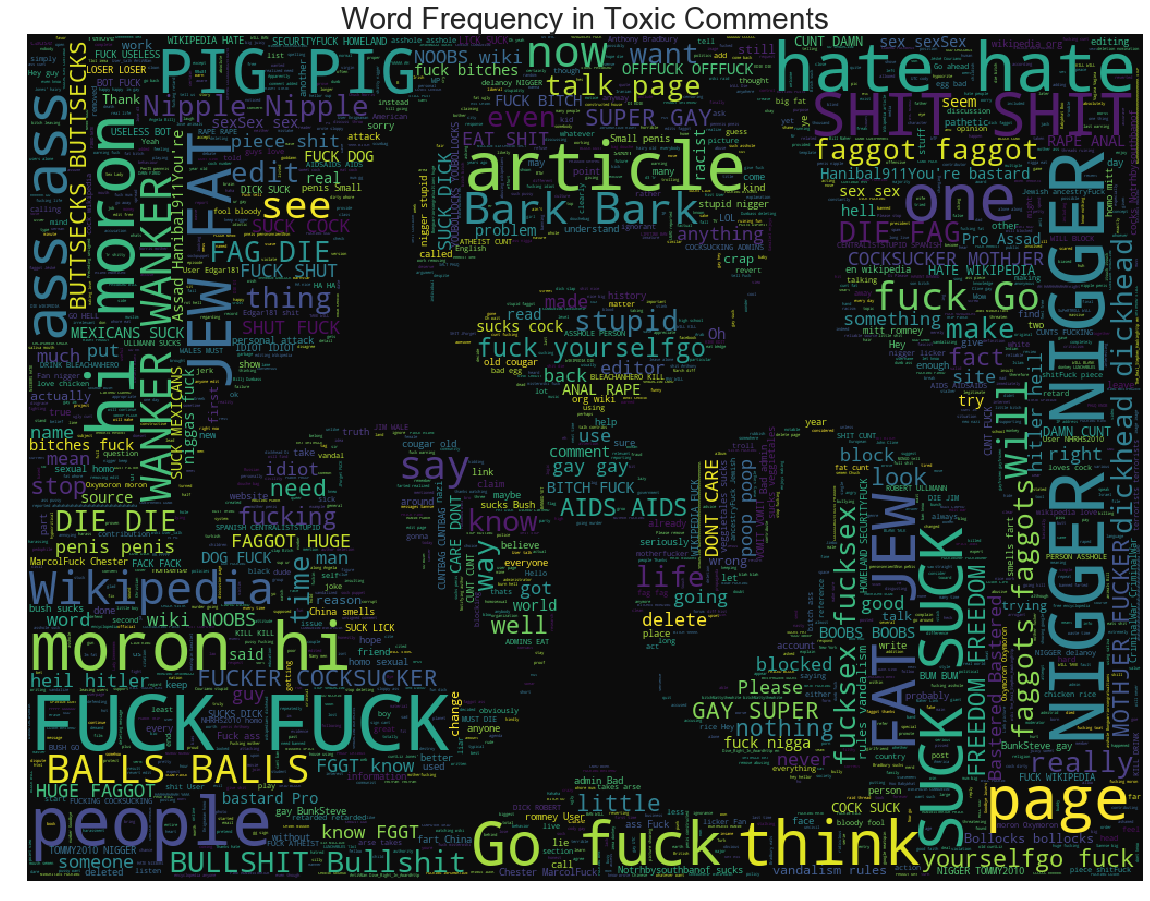
Here we look at the most common words in comments labelled as "Toxic. " You guessed it, its a picture full of curse words. A machine learning model might determine if a comment is toxic by looking for a high frequency of any of the words below.
from PIL import Image
from wordcloud import WordCloud ,STOPWORDS

stopword = set(STOPWORDS)
clean_mask = np.array(Image.open("C:/Users/harri/Desktop/toxic2.jpg"))
clean_mask = clean_mask[:, :, 1]

subset = train[train.toxic == 1]
text = subset.comment_text.values
wc = WordCloud(background_color = "black", max_words =1000, mask = clean_mask, stopwords = stopword)
wc.generate(" ".join(text))
plt.figure(figsize = (15,15))
plt.axis("off")
plt.title("Word Frequency in Toxic Comments", fontsize = 30)
plt.imshow(wc.recolor(colormap = 'viridis', random_state = 10), alpha = 0.95)
plt.show()
Interactive Visualization of Topics
Below is a cool interactive application via pyLDAvis. It shows the overlap of different comments topics as well as the most used words within each topic. We used the most salient words to get an understanding of what each topic might be describing.
Visual Explanation
- On the Left we have a 2d visualization of the 50,000 + dimensional comment space.
- Size of the circles represents the relevance of the topic within the dataset.
- Bigger circle = topic applies to more comments.
- Top 30 most salient (frequent) words within each topic are displayed on the right.
- Scroll over each topic-circle to see most salient words.
Topic Descriptions (My Opinion)
Topics Relevant to Wiki Edits
- Topics 2 & 4: Wikipedia editing lingo (clean)
- Topics 7 & 10: Help sections about posting on wikipedia (clean)
- Topic 1, 3, & 5: Subjective comments on Wiki changes (clean)
Topics Grouping Side Conversations not About Wikipedia
- Topic 8: School, music, movies, and games (clean)
- Topic 9: Politics, Race, History (clean)
- Topic 11: Pop culture, political strife, and non wikipedia things (cleanish)
Toxic Topics
- Topic 6: Pure Toxicity!
- Topics 12: Memes, Insults, and Spam
- Topics 13 & 14: Spamming curse words and some Style Formatting
ldamodel = LdaModel(corpus=corpus, num_topics=14, id2word=dictionary, random_state = 100)
pyLDAvis.enable_notebook()
pyLDAvis.gensim.prepare(ldamodel, corpus, dictionary)